myData = read.csv('polpartyfull.csv')The head() function allows us to preview the data in the csv file without printing all of the data on the notebook. This way we can quickly check that the data loaded correctly, without filling up the page with useless information.
head(myData)| Education | Politics | Count | |
|---|---|---|---|
| 1 | None | StrongDemocrat | 63 |
| 2 | None | WeakDemocrat | 45 |
| 3 | None | NearDemocrat | 34 |
| 4 | None | Independent | 87 |
| 5 | None | NearRepublican | 19 |
| 6 | None | WeakRepublican | 20 |
Notice that the rows in myData do not correspond to individual people, but rather to groups of people who all have the same educational background and political views. The count column tells us how many people we have in in group. Because of this, we cannot use the table() function to convert this data into an R table. We need to use the xtabs() function below, which has a somewhat strange input format:
myTable = xtabs(myData$Count~myData$Education+myData$Politics)
myTable
myData$Politics
myData$Education Independent NearDemocrat NearRepublican Otherparty
Bachelor 31 57 35 11
Graduate 26 20 10 5
Highschool 156 132 78 16
JrCollege 22 19 20 4
None 87 34 19 2
myData$Politics
myData$Education StrongDemocrat StrongRepublican WeakDemocrat WeakRepublican
Bachelor 56 43 44 76
Graduate 54 22 29 27
Highschool 185 98 183 147
JrCollege 32 13 30 33
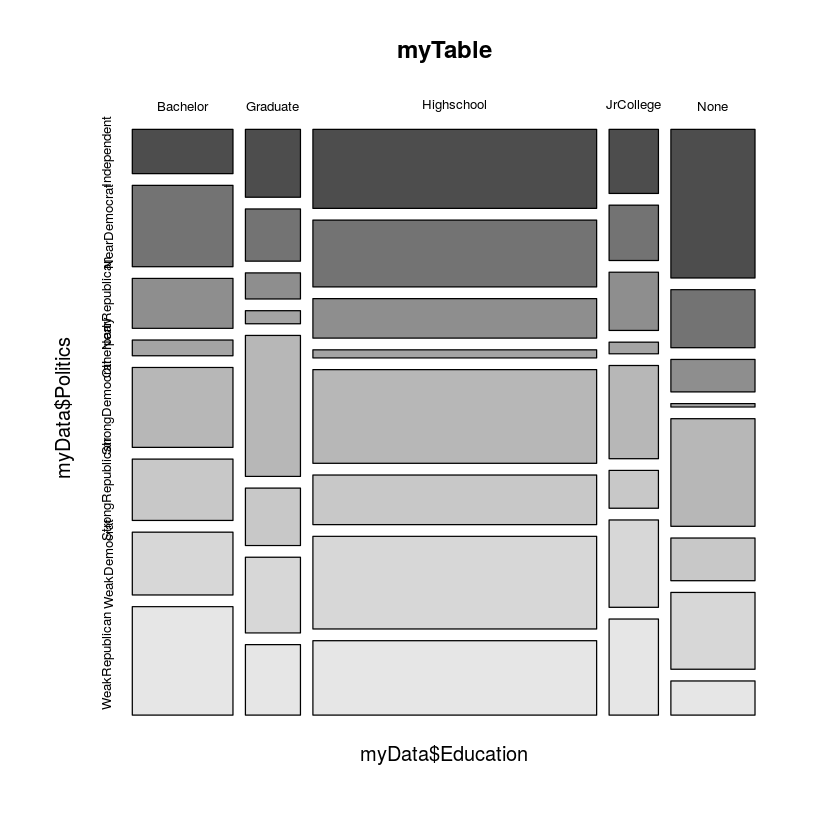
None 63 25 45 20mosaicplot(myTable,color=T)Note that this mosaic plot is a mess, mostly because the education levels and political offiliations are not in order. Also, the text on the left side overlaps, so it is very hard to read. In the cells below, I will order the political offiliation and education level data to fix this problem.
education = factor(myData$Education,levels=c("None","Highschool","JrCollege","Bachelor","Graduate"),ordered=T)
politics = factor(myData$Politics,levels=c("StrongDemocrat","WeakDemocrat","NearDemocrat","Otherparty","Independent","NearRepublican",
                    "WeakRepublican","StrongRepublican"),ordered=T)
The new variables, education and politics have the same information as myData$Education and myData$Politics, respectively, but now the categorical variables have an order that will be respected when they are put into a table or a mosaic plot.
myTable = xtabs(myData$Count~education+politics)
myTable
politics
education StrongDemocrat WeakDemocrat NearDemocrat Otherparty Independent
None 63 45 34 2 87
Highschool 185 183 132 16 156
JrCollege 32 30 19 4 22
Bachelor 56 44 57 11 31
Graduate 54 29 20 5 26
politics
education NearRepublican WeakRepublican StrongRepublican
None 19 20 25
Highschool 78 147 98
JrCollege 20 33 13
Bachelor 35 76 43
Graduate 10 27 22mosaicplot(myTable,color=T,las=1)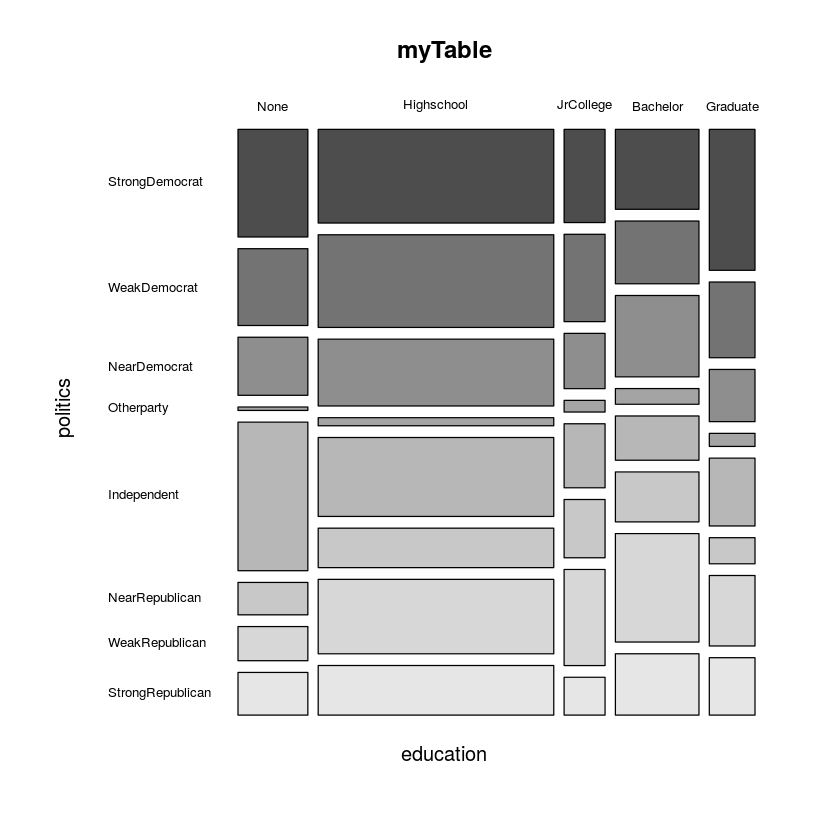
Now we can see what is going on. It appears that as education level increases from high school drop outs to high school graduates to college graduates, the proportion of people who are on the more conservative end of the spectrum increases a little and the proportion of people on the Democrat end decreases, but the trend reverses when we look at people with graduate degrees. They are more likely than anyone else to be in the StrongDemocrat category. Now that we can see that there is an apparent association between education and political views, lets do a chi-squared test to test the strength of the association. Notice the las=1 option in the mosaicplot() command. This sets all plot labels to horizontal.
chisq.test(myTable)Warning message:
In chisq.test(myTable): Chi-squared approximation may be incorrect
Pearson's Chi-squared test
data: myTable
X-squared = 111.01, df = 28, p-value = 7.753e-12Since the p-value is astronomically small, we can be very confident that the association we observed in the mosaic plot above is not a random fluke, but instead truely reflects an association between education level and political views in the population. Notice the warning message above. That warning is probably due to the fact that the counts in the Otherparty column are so low (two below 5). We can remove that column from the table and recompute the chi-squared test to make sure.
myTable[,-c(4)]| StrongDemocrat | WeakDemocrat | NearDemocrat | Independent | NearRepublican | WeakRepublican | StrongRepublican | |
|---|---|---|---|---|---|---|---|
| None | 63 | 45 | 34 | 87 | 19 | 20 | 25 |
| Highschool | 185 | 183 | 132 | 156 | 78 | 147 | 98 |
| JrCollege | 32 | 30 | 19 | 22 | 20 | 33 | 13 |
| Bachelor | 56 | 44 | 57 | 31 | 35 | 76 | 43 |
| Graduate | 54 | 29 | 20 | 26 | 10 | 27 | 22 |
chisq.test(myTable[,-c(4)]) Pearson's Chi-squared test
data: myTable[, -c(4)]
X-squared = 104.63, df = 24, p-value = 4.832e-12Now there is no warning and the p-value is roughly the same order of magnitude. Also there are relatively few respondents who identified with another political party, so removing those people from the data is completely reasonable.